Accessing
iNetGrow from the Internet
There are several ways you can
access iNetGrow controllers from the Internet. These differ in how the controller is connected to the
Internet, your scope and security preferences, and how you want to access the controller.
Accessing iNetGrow Controllers
Using the iNetGrow Software
Direct Connection to the
Internet
It is perhaps the physically
simplest to connect an iNetGrow controller directly to the Internet. Once directly connected, you may use
the iNetGrow software to access the controller. Direct connection has two major disadvantages. First, you must find a direct
connection to the Internet. Some
large companies may have IP addresses they can use. In general, it is not cost-effective to dedicate an IP address
to a controller. Second,
connecting the controller directly to the Internet would allow a wider
access. Even if you implement
password security, the controller will receive many messages over the Internet,
which will reduce its capability to handle its own tasks. In a worst-case scenario, the
controller may get so many simple requests (say ping requests) that it will
practically stop from serving its modules. There is no “fix” for such a situation, because the
controller cannot, beforehand, know if an incoming message is a legitimate one,
or a time-wasting one. It must
service the message to find out its contents.
Connection through a LAN
Connection through a LAN is a
better solution. Access to the
iNetGrow controller is similar to accessing the controller directly. On the positive side, you need not
dedicate an IP address for a single controller. Many devices on the LAN could use the same IP address. Thus, this method is much more
efficient in terms of conserving IP addresses. More importantly, though, the LAN gateway acts as a router,
screening most messages. The
iNetGrow controller need not be bothered by all the network traffic. The controller receives only those
messages that are forwarded to it.
Such a setup requires the router to be programmed so that it forwards
UDP messages to port 8448 to the local IP address of the controller. For instance, if we use the default
controller IP, the router would forward UDP messages on port 4884 to the local
IP address 192.168.0.65. Again,
you may install and run the iNetGrow program on any PC on the Internet and
access the LAN through the gateway.
Dynamic IP Addresses
Connecting your LAN to the
Internet through a modem introduces another issue. If know the IP address of the gateway (the WAN side IP
address) then you may use this to connect to the controller. However, if the gateway is connected to
the WAN using a modem, then the IP address is typically assigned by the
Internet Service Provider (ISP) each time a connection is established. This is known as a dynamic IP
address. Many routers allow the
dynamic IP address to be forwarded to a service, such as DynDNS (www.dyndns.org) to be made public. Once you have registered with such a
service, then you can access your controller by its name. For example, you may register your
connection with DynDNS under the name PatsGreenhouse. Then configure your router to notify DynDNS to update the
record each time a connection is made and a new IP address is assigned. Once complete, you may reach your LAN,
and hence your controller, by its name PatsGreenhouse.dyndns.com.
Accessing iNetGrow Controllers
through a Web Server
The topics above allow you to
use the iNetGrow software do communicate with the controller. In this respect, the Internet becomes
just a vehicle for the communications.
Being global, you can reach the iNetGrow controller from anywhere in the
world.
The iNetGrow system is designed
not only to communicate with the Internet, but also cooperate with other
Internet services. Most notably,
iNetGrow has many features that make it easy to integrate controller
information and setting with web pages.
There are widespread advantages in such an approach. First, let us discuss the components of
such a system. The diagram below
depicts a LAN with a modem connection to the Internet. The LAN has a workstation that acts as
a web server. The router should be
programmed to forward web (HTTP) requests to the web server. HTTP uses port 80. That is, program the router to forward
TCP messages to the IP address of the web server. Most routers have a standard entry for HTTP, where you
simply specify the local IP address of the web server.
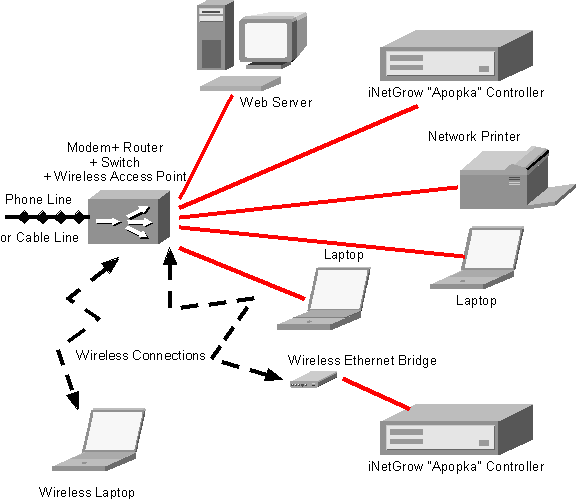
The web server may construct
HTML files or Active Server Pages (ASP) with content that reflects the I/O from
the controllers. The iNetGrowX.ocx
ActiveX component allows web designers to make function calls to build such
content. Refer to the sections
under “Web Services” for more information about
iNetGrowX, ActiveX, and ASP.
There are several advantages to
running a web server on the LAN.
User-Friendly Interface
The web interface allows users
to view the information in a browser.
Web browsers have become the familiar human-machine interface of recent
years. Web pages may be organized
according to the specific needs of your system. There could be many pages. Pages may display pictures and controls (such as slide bars,
check boxes, etc.) that make the interface easy to use. Moreover, a web page may have many
links to supplementary topics, or to e-mail.
Access from Web-Enabled Devices
Once you have a web server,
access to the iNetGrow controller need not be through the iNetGrow software. This allows web-enabled devices such as
cell phones with web access to be used.
Security
Security is always a
concern. By channeling access to
your controllers through a web site, you can implement further security
measures. For example, you could
ask the user for a user ID and a password. Similarly, you could implement many levels of users and give
these user groups access to different aspects of the system.
Efficiency
By moving the burden to provide
information to the end user to the web server, you free the resources of the
controllers to more efficiently service its own tasks. Information may be gathered
periodically, say once a minute, and placed on a web page. Then, all requests could be satisfied
by the web server without bothering the controllers.
Also see : Basic
LAN Configurations, Accessing iNetGrow from
the Internet.

© Rigel Corporation iNetGrow 2003-2006. All rights reserved.