Controller
Setup
Controllers constitute the
middle-level resources in iNetGrow that links the smart I/O (input/output)
modules to the PCs on the LAN. On
one side, controllers are connected to the LAN, same as the PCs. On the other end, each controller has
four mNet ports, which can support up to a total of 16 smart I/O modules (see mNet). Note
that each smart I/O module may have many inputs or outputs.
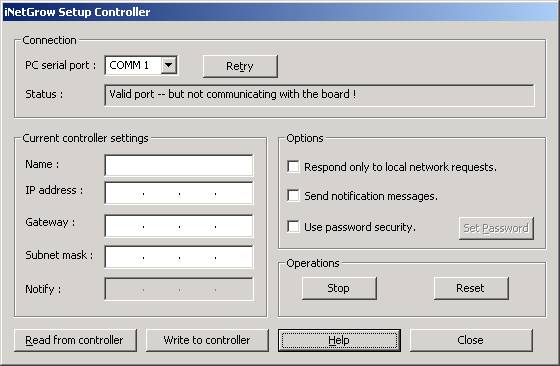
Identifying the Controller
Each controller on the LAN is
identified by its IP (Internet protocol) address. This is a four-octet number written in the dotted format,
e.g. 192.168.0.65. Each octet is a
value between 0 and 255.
Similarly, each controller must be given a minimal set of LAN information. This information includes the IP
address of the gateway, and the subnet mask.
In addition, each controller is
given a text (ASCII) name. The
name may consist of characters, digits, and the underscore (‘_’)
character. Other punctuation
characters are not allowed. Names
must be 15 characters or shorter.
Security
The security parameters are set
during controller set up. Two
independent security features are provided. First, a password scheme implements three security levels by
using three separate passwords (see Password
Security). Second, the
controller may be instructed only to respond to requests from the LAN. This disallows any request received
from the Internet, while allowing access to the PCs on the LAN.
These passwords control the type
of access to the controller. A
“read password” is used to screen other nodes when they want to read (view) the
data related to the controller and its modules. A “write password” is used to screen other nodes when they
want to write to the controller or its modules (modify the outputs). Finally, a “log/program password) is
used to screen other nodes when they want to change the logging scheme or
change automated tasks performed by the controller.

© Rigel Corporation iNetGrow 2003-2006. All rights reserved.